OTA Updates in Flutter with Shorebird : [Realtime Code Push | Silent Updates]
![OTA Updates in Flutter with Shorebird : [Realtime Code Push | Silent Updates]](/shorebird-cover.webp)
Why We Needed OTA Updates
We pushed a build with a small logic error. It was a one-line fix.
By the time we noticed, the app was already crashing on our users’ devices. Sentry was firing nonstop.
We fixed the code fast. But shipping the fix was slow. The new build took about 8 hours to go live on Android and 12 hours on iOS. The crashes kept happening the whole time.
That’s when we knew we needed OTA updates. That’s how we found Shorebird.
What is Shorebird?
Shorebird is a code push tool for Flutter. It sends Dart code updates (called patches) straight to your users’ phones. No new store release. No store review.
- Silent. Patches download in the background. Users don’t have to do anything.
- Fast. Patches skip store review, so they reach users far sooner than a normal release.
- Simple for users. The patch applies the next time the app restarts.
Shorebird patches Dart code only. Native changes, like a new plugin or a new permission, still need a store release.
Getting Started
We run Shorebird in our production app, with two flavors: dev and prod. Here is the setup, step by step.
1. Create an Account
Sign up on the Shorebird Console: shorebird.dev
2. Install the CLI
Mac / Linux
curl --proto '=https' --tlsv1.2 https://raw.githubusercontent.com/shorebirdtech/install/main/install.sh -sSf | bashShorebird CI was deprecated on August 8, 2026. Please switch to the open source package shorebird .
3. Verify the Setup
shorebird doctorIf it works, you’ll see something like this:
[~]$ shorebird doctor
Shorebird 1.6.119 • git@github.com:shorebirdtech/shorebird.git
Flutter 3.47.1 • revision 91f8bd75076e9c740aa13cf67eb9ec1a093f68f5
Engine • revision 03e67977a7ff5893d96ac97f22c6a795530c0040

URL Reachability
✓ https://api.shorebird.dev OK (0.5s)
✓ https://console.shorebird.dev OK (1.2s)
✓ https://oauth2.googleapis.com OK (0.2s)
✓ https://storage.googleapis.com OK (0.1s)
✓ https://cdn.shorebird.cloud OK (96ms)

✓ Shorebird is up-to-date (3.2s)
  [!] A new version of shorebird is available! Run `shorebird upgrade` to upgrade.
✓ Xcode project does not override FLUTTER_ build settings (0ms)
1 issue detected.

A new version of shorebird is available!
Run shorebird upgrade to upgrade.
[~]$
That warning is fine. It only means a newer version is available.
4. Log In
shorebird loginThis opens a browser window. Log in, then return to your terminal.
5. Add Shorebird to Your App
Existing app
shorebird init6. Keep It Up to Date
shorebird upgradeConfiguring shorebird.yaml
After shorebird init or shorebird create, Shorebird adds a shorebird.yaml file to your project root.
# This file is used to configure the Shorebird updater used by your application.
# Learn more at https://shorebird.dev
# This file should be checked into version control.

# This is the unique identifier assigned to your app.
# It is used by your app to request the correct patches from Shorebird servers.
app_id: 864ab1b0-ba78-4b15-990a-a63cec35a41b
flavors:
  dev: 864ab1b0-ba78-4b15-990a-a63cec35a41b
  prod: 6b6e6631-4fbe-4645-8d9d-d5247656d975
A few things to know:
- Each flavor gets its own app ID. This keeps
devandprodpatches apart. - Your
app_idis not a secret. Commit it and share it freely. - Docs: Initialize Shorebird
Releasing and Patching
Shorebird works in two steps: first a release, then patches on top of it.
1. Create a Release
You can’t patch until you have a release. This is the build you upload to the Google Play Store or the Apple App Store.
Android
shorebird release android --flavor dev
shorebird release android --flavor prod2. Preview the Release
Run the release on a device or emulator before you ship it.
shorebird preview3. Push a Patch
Fixed a bug in Dart code? Push a patch. It reaches every user on that release version. No store review.
Android
shorebird patch android --flavor dev
shorebird patch android --flavor prodTracking Releases in the Console
Releases
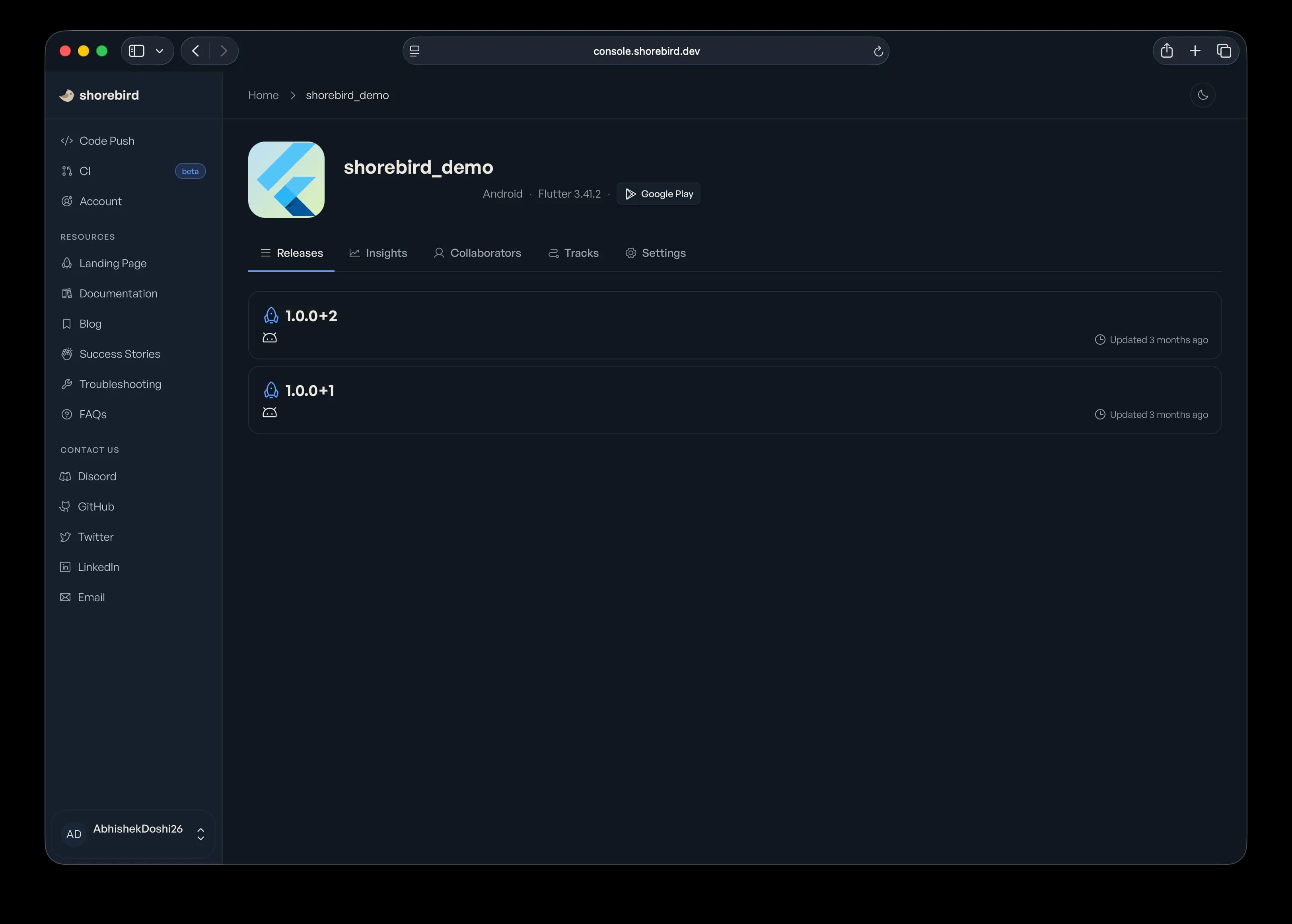
Every release and patch shows up in the Shorebird Console . Pick your app to see its releases, and open one to see its patches.
Insights
The Insights tab shows how many people actually use your app.
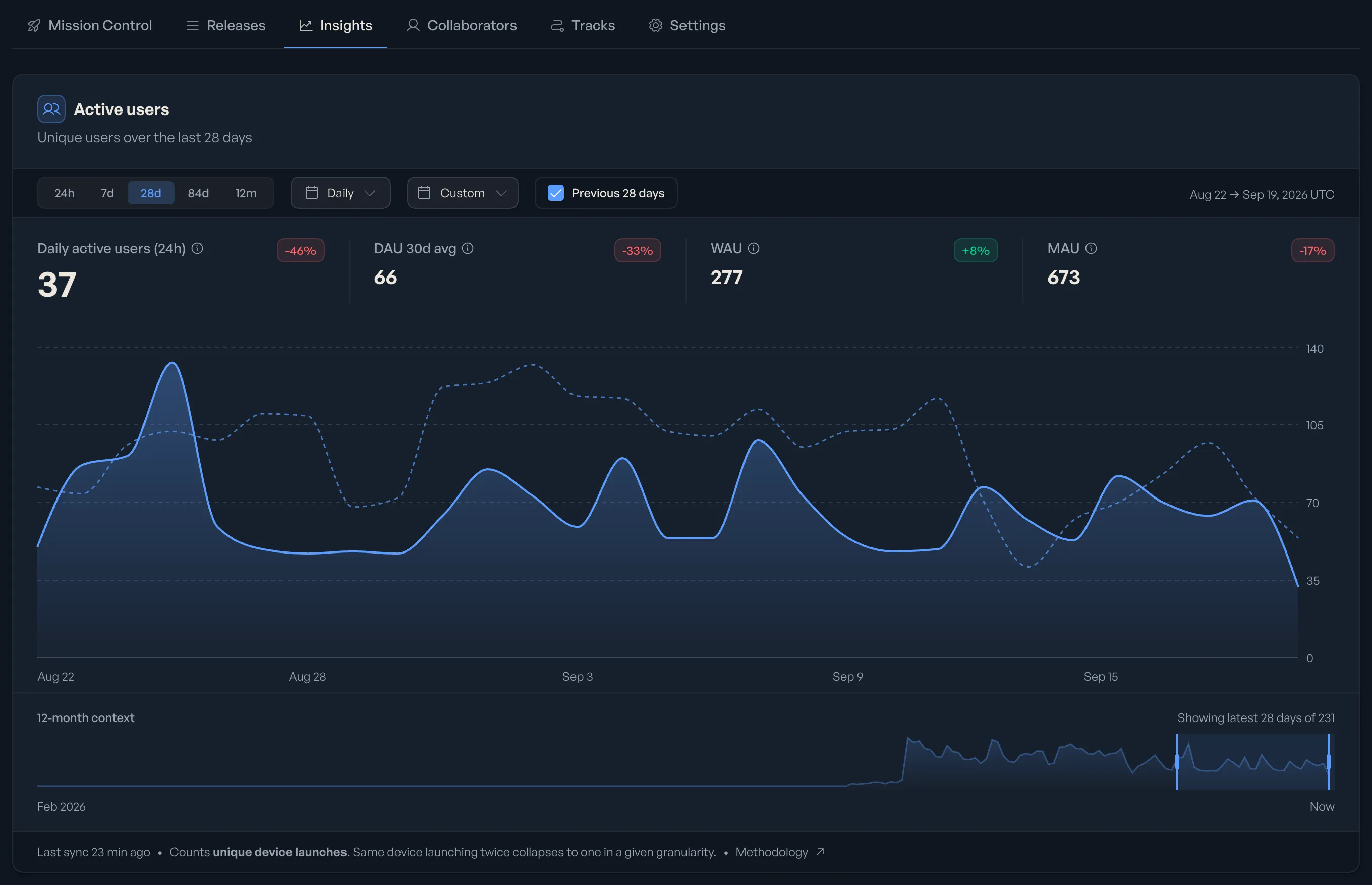
- DAU, WAU, MAU. Daily, weekly and monthly active users, with the change against the previous period.
- Time range. Switch between 24h, 7d, 28d, 84d and 12m, or set a custom range.
- Compare. Turn on “Previous 28 days” to draw the last period as a dotted line.
Insights count unique device launches. The same device launching twice counts once.
Conclusion
That one-line bug taught us something: writing the fix is the easy part. Getting it to your users is what hurts. With store reviews, a fix can take 8 to 12 hours to go live. In that time, every crash is a real person having a bad day.
Shorebird changed that for us. Setup took one sitting: install the CLI, run shorebird init, and you’re ready. After that, the flow is short:
- Release the build you send to the stores.
- Preview it on a device.
- Patch it when something breaks.
Our dev and prod flavors keep test patches away from real users. The Console shows what shipped, and Insights shows how many people are on it.
A few things to keep in mind:
- Shorebird patches Dart code only. Native changes still need a store release.
- Patches apply on the next app restart, not instantly.
- Always try a patch on
devbefore you push it toprod.
Shorebird is not a replacement for good testing or a proper release process. It is a safety net. When something slips through, you can fix it in minutes instead of waiting a day.
If you ship a Flutter app to real users, set it up before you need it. We wish we had.
